Sales, purchasing, warehouse, finance, HR, logistics, service, production — we automate any repetitive process, from an incoming email to a management report.
An email, PDF, spreadsheet, scan or photo becomes a request, an accounting entry or a chat card. The original stays alongside, so any figure can be checked.
What we take on
We’ll sort a shared inbox: requests, invoices, supplier emails — each in its place.
We’ll read attachments: items, prices, company details and dates land in the right fields.
We’ll assemble the shipping document pack and post it as a card to the warehouse chat.
We’ll check supplier documents against public registers and remind you of deadlines.
We’ll move bank statements from email into a transactions table for each legal entity.
We’ll build a deal document archive your staff can access.
We’ll sort HR and accounting paperwork: applications, certificates of work, invoices — by folder and deadline.
We’ll connect other inputs too: shared folders, website forms, supplier and customer portals.
Example: the delivery document pack assembles itself, and bank statements flow into a shared table on their own.
Email and attachments linked to the request
A poor scan won’t be fully read — the system says so and sends it to a person. We don’t replace e-signatures or e-document exchange: your accounting system and your e-document provider handle them.
02Rules and human decisions
The system prepares. A person decides.
Your process rules are checked automatically. If something is missing, the request stops with a clear reason and goes to the person in charge. A person approves.
What we take on
We’ll write down the rules: what goes into a pack, which fields are required, what counts as an error.
Anything incomplete stops with the person in charge — with a reason, not silently.
The original and the extracted data on one screen; approval in one tap.
We’ll keep a history: who confirmed or returned what, and when.
Approvals for any document: contracts, invoices to pay, purchase requests, leave requests.
Example: people choose the driver and settle disputed amounts; the system prepares everything else in advance.
Data collected · ready for review
Before launch we agree on what the system does itself and what it only suggests.
03Orders and accounting
An order — through to shipment and reconciliation.
An order from EDI, email, the website or the CRM arrives as a chat card; replacements and cancellations update the same card, and accounting sees the status. Once the accounting system issues the documents, we assemble the shipping pack.
What we take on
We’ll connect orders from any channel — EDI, email, website, CRM: a chat card, with replacements and cancellations handled without manual edits.
We’ll link your accounting system to your workflows through its interfaces: sales, invoice numbers, counterparties.
We’ll write orders into accounting, with a retry queue for when the database is unavailable.
We’ll unify the shipment log: a spreadsheet for people, a database for automation — synced both ways.
We’ll connect transport to accounting: pick a driver with a button and accounting rebuilds the documents.
We’ll set up reconciliations with customers, suppliers and carriers and untangle fragile spreadsheets.
Example: national retailer orders, the shipment log, documents and reconciliations form one chain.
Order received · card in the warehouse chat
Changes inside the accounting system itself are made by its specialist — we connect from outside. An EDI provider that is new to us gets a trial connection first.
04Messengers, bots and work chats
A button in the chat instead of a spreadsheet.
An event arrives as a card in the right chat, a person answers with a button — the card updates in place and accounting gets the result. No more forwarding spreadsheets.
What we take on
We’ll build bots for any department — warehouse, logistics, sales, HR, service — and for your customers: buttons instead of forms.
We’ll set up work chats around processes: orders, transport, warehouse, documents, sales.
We’ll build a bot that accepts documents and photos, checks them and asks for what’s missing.
We’ll schedule summaries: daily results, manager metrics, system status.
We’ll launch a channel bot: sources, draft post, moderation, publishing.
We’ll connect a bot to any process: customer requests, service bookings, approvals, staff requests, reminders.
Example: the logistics manager picks a driver with a button, the warehouse accepts deliveries from a card, and a bot collects supplier documents.
Answer with a button on the example card
We choose the messenger that suits your team and customers. A bot writes to your customers only in an agreed scenario.
05CRM, email and calls
Deals, emails, calls — in one record.
We’ll connect your CRM to automation: a new deal or a stage change triggers the right action — an estimate, a chat message, a note in the record. Calls become text with a summary.
What we take on
We’ll connect your CRM: deal events trigger an estimate, a chat message, a note in the deal record.
We’ll map your funnel as it is: where deals get lost and what each stage costs.
We’ll send reports to your messenger: an evening summary, manager metrics, stalled deals.
We’ll enrich company records: details from the tax registry, court cases, enforcement proceedings.
We’ll transcribe calls and voicemail: text and summary go to the record, a voicemail becomes a lead.
We’ll keep a deal document archive right in the CRM.
Example: each new request gets a draft estimate, managers get an evening summary, and voicemail gets a transcript and its own lead.
Deal created · draft estimate in the manager’s chat
We work with your CRM. The system writes to it only what has been agreed.
06Tenders and procurement
Tenders in the chat, decisions by button.
Retail tenders, public procurement, commercial platforms or your own purchasing from suppliers: procedures, items, prices and the schedule are gathered in a chat hub and the dashboard. Each item is decided with a button, and a watchdog keeps an eye on the bidding automation.
What we take on
We’ll connect any platform or purchasing process: procedures, items and prices in a chat hub, decisions by button.
We’ll gather tenders in a database: schedule, item specs, results, base prices and markup.
We’ll show tenders in the dashboard next to shipments and documents.
We’ll add a watchdog: a check before the bidding window, an alert on failure, an event log.
We’ll send price requests to suppliers and compare the offers: price, lead time, terms.
We’ll sort tender email: which platforms write, where the terms are, where the claims are.
Example: retail tenders arrive in a work hub, item decisions are made in the chat, and results sit in the dashboard.
Tap an item to change the decision
We don’t write robots that place bids on their own — we work alongside yours. Nobody can guarantee winning a tender.
07AI and estimates
AI prepares the draft. A specialist sets the price.
We’ll put AI on routine work: reading emails, scans and spreadsheets, sorting, summaries. For manufacturers, an estimating pipeline: a draft cost from the drawing and request, at your rates.
What we take on
We’ll teach the system to read and sort what comes in: emails, scans, spreadsheets, calls.
A draft cost from a drawing: material, operations, hours — at your rates.
We’ll build a price base from supplier correspondence: every price has a source and a date.
We’ll measure quality honestly: the robot’s estimate next to the specialist’s.
We’ll show what AI costs for each project and operation.
For simple tasks, a local model on your own computer — data stays inside.
Example: a request with a drawing arrives already parsed, the robot prepares a draft, and the engineer compares it with their own estimate in the dashboard.
Draft ready · operations and hours at your rates
The model estimates operations and hours; code turns them into rubles at your rates. The system doesn’t set the price or write to the customer on its own. We don’t promise an accuracy percentage — we show the differences on your own requests.
08Server and reliability
Your own server. Under watch.
We’ll set up and maintain a server for your services: containers, databases, HTTPS, with only what’s needed exposed. Backups are verified by restoring them; a failed service restarts itself.
What we take on
We’ll set up a server: services in containers, databases, HTTPS and domains.
We’ll set up backups: a nightly snapshot with a restore check and an off-server copy.
We’ll add watchdogs: a failed service restarts, and you hear about it in your messenger.
We’ll set up monitoring: data freshness and key and token expiry — in the chat and the dashboard.
We’ll set up a workflow platform: schedules, webhooks, email triggers, versions with rollback.
We’ll tidy up access: keys kept apart from working folders, releases with rollback.
Example: one server runs the automation and services of several projects — a nightly database backup and a status summary in a service chat.
All services running · backed up last night
We don’t promise clusters or 24/7 on-call, and we don’t do penetration testing. A server on your premises is a separate conversation.
09Dashboards and reports
Automation you can see.
Queues, results and what’s waiting for a decision — on one screen. Each project has its own sections and permissions. Management sees shipments, documents and deadlines, AI spend and automation health.
What we take on
We’ll build a dashboard for your process: queues, results, decisions; role-based access.
A management screen: shipments by customer and period, documents and their deadlines, tenders.
“Pulse”: automation health and data freshness — without the jargon.
A specialist screen: estimate checks and a rates table you can edit in place.
A data audit: from your CRM and email we show the process as it is — funnel, bottlenecks, losses.
Actual margin: sale versus purchase for every item.
Example: a wholesale business, an estimating project and a farm share one dashboard on a common core, each with its own sections.
The dashboard is web-based and opens in a phone browser; a mobile app is a separate AXM Software job. Screenshots show demo data.
10Websites, 3D models and video
A website that shows the product.
We build websites with interactive 3D stories and a lightweight product model for the browser: compartments open, assemblies light up. This page is an example of that work.
What we take on
A website with 3D stories: a lighter mode on phones, and motion can be turned off.
An English version and hosting on your own server: HTTPS, updates with rollback.
A 3D product model for the website and presentations; a device model from photos and measurements.
Mechanism animation with real kinematics and clearance checks in motion.
Renders and video: motion from our animation, a neural network adds camera work and light.
A tool on the website — for example, a parcel check by cadastral number.
Example: this website, the Bee rover story and the cadastral-number field check.
We don’t design logos or brand identities — we build the site in yours. Production drawings are not our work. The Cell is a device concept, not a production product.
11Devices and fields
Devices — connected to the server.
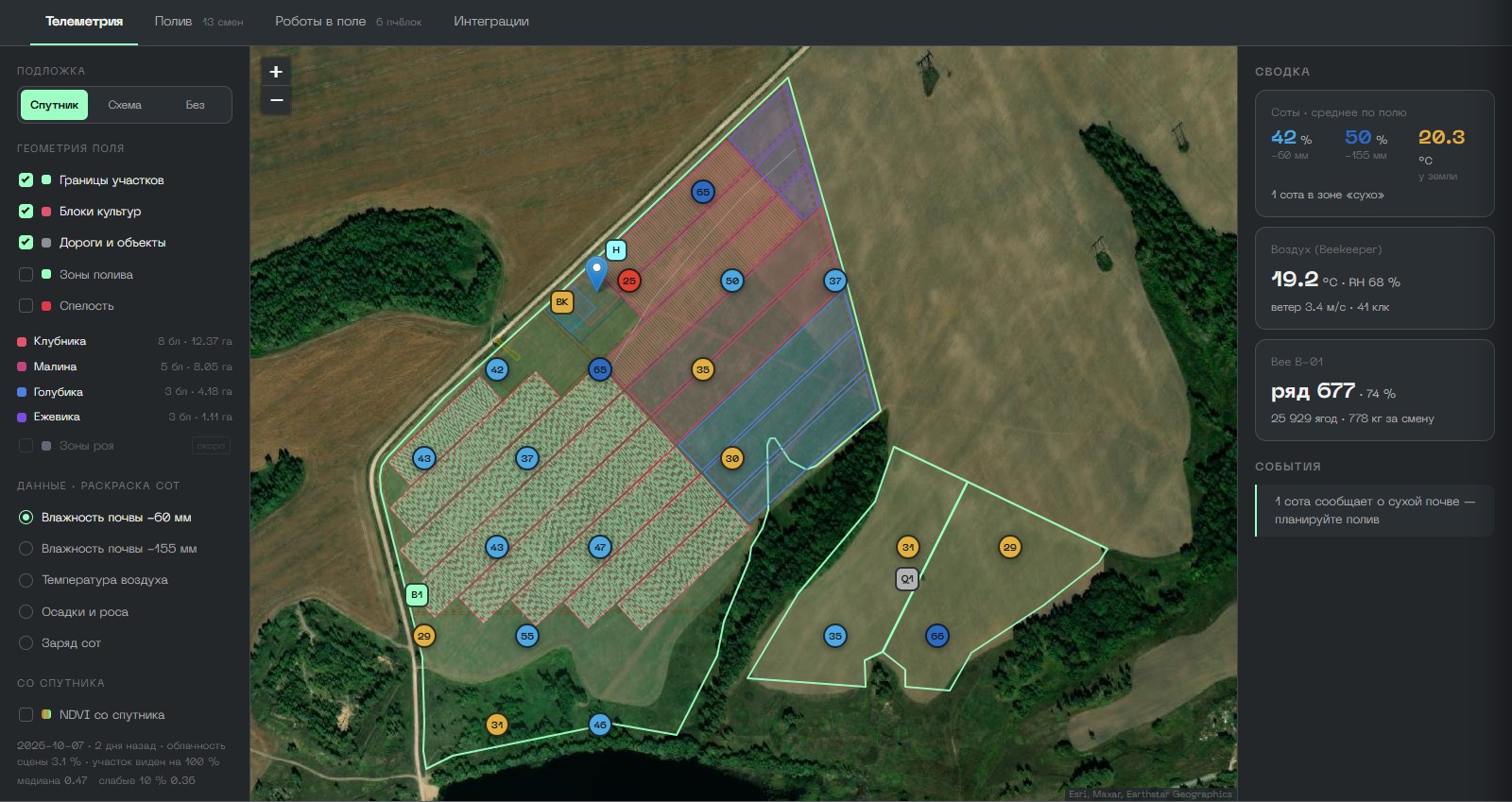
We’ll write or restore firmware, connect the device to a server and bring it into the dashboard. For fields: parcels on a map with a satellite layer and an irrigation design.
What we take on
Firmware for microcontrollers and controllers: sensors, relays, updates over Wi-Fi.
Telemetry received on the server and stored in a database.
The device in the dashboard; an emulator to test the screen before the hardware is connected.
A field sensor network design: LoRa cells, a gateway, link and solar power calculations.
Parcels on a map: boundaries from the land registry, area, a satellite image.
An irrigation design on the map: zones, shifts, valves — from the drawing and the calendar.
Example: the vertical farm’s firmware updates over Wi-Fi, and the farm dashboard shows parcels, satellite layers and the irrigation plan.
The field sensor network is not deployed yet, and valve control in the field has not been tested. We don’t do series production or device certification.
12Business scenarios
Your processes. Your configuration.
What different businesses most often hand over to us. The parts repeat; the rules and results are each their own.
Retail deliveries in one chain.
EDI orders as chat cards, a shipment log in a spreadsheet and a database, a document pack for every delivery, drivers in the chat, reconciliations with customers and the carrier, tenders in a hub.
An example from practice. Choosing the driver and disputed amounts stay with people.
From a request with a drawing to a draft estimate.
Requests from email and the CRM parsed, drawings alongside, a draft cost at your rates, a supplier price base with sources, summaries for managers.
An example from practice. The engineer checks the estimate, the manager sets the quoted price. The system doesn’t write to the customer on its own.
Emails, payments and deals — nothing lost in the threads.
A shared inbox sorted into requests and deals, bank statements in a transactions table, counterparty records enriched from open data, a document archive, summaries and reminders in your messenger.
A responsible person confirms payments, commitments and disputed data.
A field and its work plan on one map.
Parcels from the land registry with a satellite layer, irrigation designed by zone and shift, a model of machinery work by field block, devices and sensors in the dashboard.
The dashboard is available. Field hardware control still needs deployment and testing.
EDI order · chat card · accounting · documents · driver · shipment · reconciliation
13Getting started
Start with one of your processes.
Tell us what you move by hand today: where it comes from, where it goes, where mistakes happen. We’ll map the process, build a pilot on your data and agree how to measure the benefit.
Map the process — with read-only access
A pilot in one area
Deploy and support
Useful to have: a sample email or file, read-only access to email or the CRM, and a person who makes the decisions.